
2026
AI Editing for Floor Plans: Talk to Your Plan, See Changes Live
Edit floor plans by chatting with AI. Resize rooms, add spaces, flip layouts in minutes. See real examples and prompting tips.

Caroline Boulard
Head of Growth
8 min read
AI editing is how you change a floor plan by describing it. Type what you want, watch the layout update live. It handles rooms, walls, and overall layout, one prompt at a time.
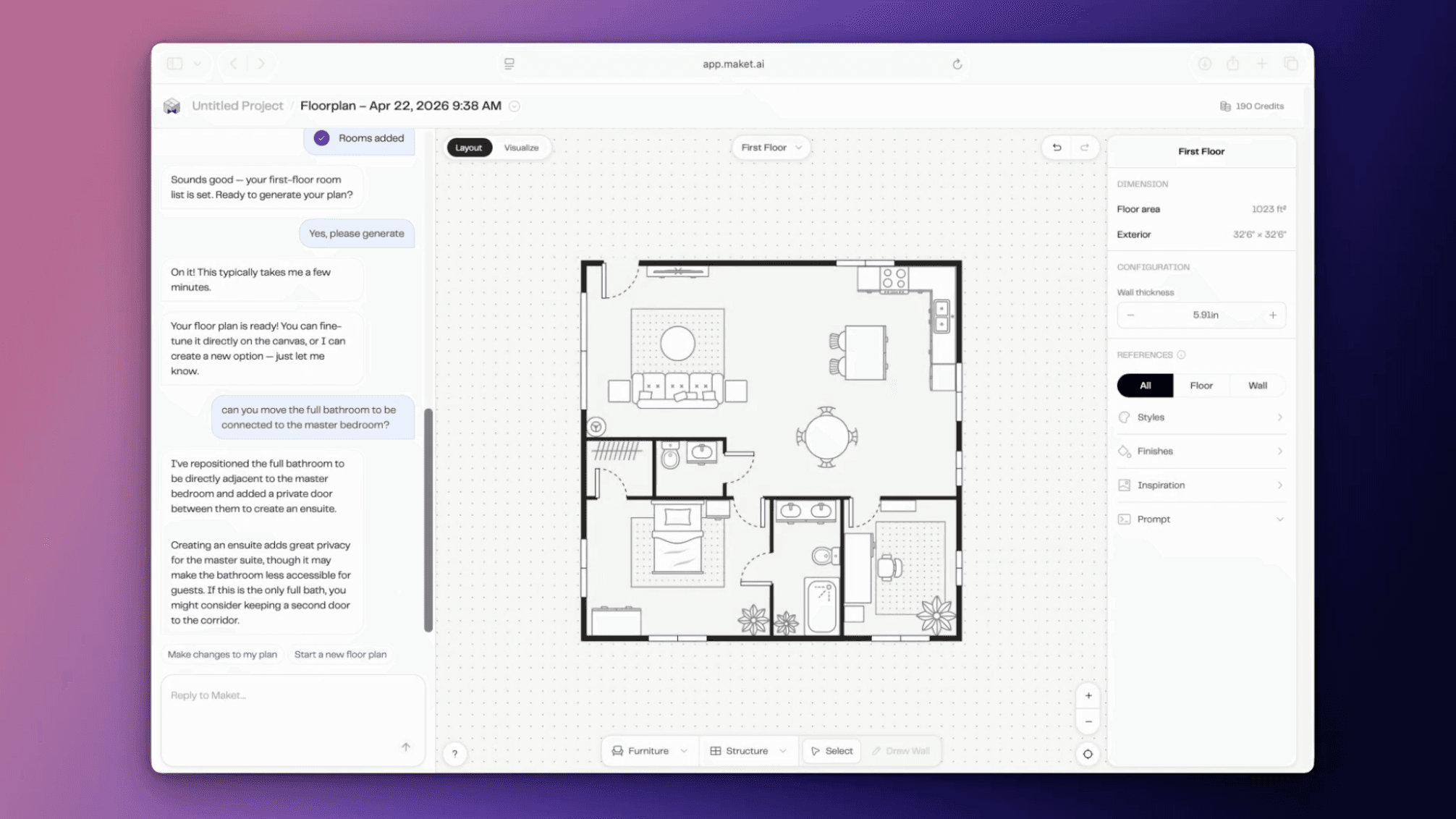
AI editing turns floor plan changes into a conversation. Instead of dragging walls or clicking through menus, you type what you want, and the plan updates live. "Make the kitchen 30 percent bigger." "Add a powder room near the entry." "Flip the layout."
It's a tool for everyone in the design conversation: homeowners, designers, architects, and builders.
Prefer to watch? See AI editing in action in our 4-minute walkthrough on YouTube.
Note: Maket is evolving fast. New features and improvements are released regularly, so some details in this guide may change over time. We will keep this page updated as the platform grows.
What is AI editing?
AI editing is a chat-based way to modify a floor plan. Instead of dragging walls on a canvas or sending revisions to a draftsperson, you describe the change you want and the AI applies it directly to your plan.
You can be general ("reorganize this for better flow") or specific ("rotate the plan 180 degrees"). Each change happens in seconds for simple edits, or up to a minute or two for complex ones. The plan stays editable on the canvas at all times, so you can switch between chat and manual edits whenever you want.
For a broader look at how AI floor plan generators work, see our complete guide to AI floor plan generators.
How AI editing works
Once you have a floor plan generated (from a set of requirements, or by uploading an existing one), the chat panel sits next to your canvas. You type a request, like "make the kitchen 30 percent bigger," and hit send. The kitchen expands, the rooms around it adjust, and you see the result in seconds.
You can chain requests, undo any step, and keep iterating until the plan matches what you have in mind. Think of it as a conversation, not a command. Each request builds on the previous state of the plan.
What you can ask the AI to do
Say you generated a 1,800 sqft, 3-bedroom plan, and the kitchen feels small. Type "make the kitchen 30 percent bigger," and watch the kitchen expand while the surrounding rooms reflow to fit. That's one prompt, one change.
Here are the kinds of edits that work well today:
"Make the kitchen 30 percent bigger"
"Add a powder room near the entry"
"Add a home office on the first floor"
"Flip the layout"
"Rotate the plan 180 degrees"
"Swap the bedroom and the office"
"Merge the two small bedrooms into one large bedroom"
You can be as general or as specific as you want. Simple edits happen in seconds. More complex changes (a swap, a full reshuffle) can take up to a minute or two. Each request builds on the previous state of the plan, so you can chain them the way you would in a conversation with an architect.
How to get the best results
The chat interface is forgiving, but a few habits will save you time.
One change at a time. Don't paste a long list of edits into one prompt. The longer the prompt, the less reliably the AI respects every part of it. Step by step is easier to undo, easier to evaluate, and produces better results overall.
Keep it short and concrete. "Make the kitchen bigger" works. "Rotate the plan 180 degrees" works. Vague, open-ended prompts like "reorganize this for better flow" can give unpredictable results because the AI has to guess what "better" means to you. If you want the AI to make judgment calls, narrow the scope first ("reorganize the ground floor only").
Iterate the way you would with an architect. Generate, look, react, refine. The first result is rarely the final one, and that's the point.
Use undo freely. Every change is reversible. If a result moves the plan in a direction you don't like, undo and try a different prompt.
What AI editing won't do (yet)
Being upfront about the limits saves you from prompting in the wrong direction.
Furniture placement. Adding, moving, or rotating specific pieces (a sofa, a bed, a nightstand) is done manually on the canvas. The chat handles walls, rooms, and overall layout. Use the furniture catalog and drag pieces into rooms when you need them.
Construction documents. What you see is a schematic floor plan, not a permit set. Your architect or engineer still stamps the drawings that go to the city. AI editing handles roughly 70 to 75 percent of the schematic phase. The rest is where your architect earns their fee.
Style and materials. Choosing finishes, paint colors, or design references happens in the Visualizer, not the chat. That's where you bring the plan to life in 3D.
Commercial projects. Residential only for now. Office buildings, retail, and other commercial layouts are not supported.
Who uses AI editing
Homeowners. Walk into your architect meeting with a real plan instead of a Pinterest board. Sketching ideas yourself before you sit down with a professional makes that conversation faster and more concrete.
Builders. Generate three layout options before a client meeting, then edit live based on feedback in the room. The visualizer pairs well with the chat for showing what the finished space could look like. For a deeper walkthrough of the full workflow (generating, editing, visualizing), see how to use Maket as a home builder.
Designers. Your clients arrive with a clear vision instead of "I'll know it when I see it." When the plan is editable in real time, the conversation moves from describing to deciding.
Why this matters
Iterating on a floor plan used to mean waiting days between rounds. AI editing compresses that loop into minutes, which means more options explored before you commit, fewer surprises later, and more productive conversations with the people designing alongside you.
It doesn't replace your architect or designer. It changes what you can show up with, and how quickly the conversation can move. For an insider's take on this shift, see The Future of Architecture: An Insider Take on AI.
Try it
That's AI editing. You talk. The plan listens.
Try Maket free, no credit card required. Generate a plan, open the chat, and describe a change. See what happens.
Frequently asked questions
What is AI editing in Maket?
AI editing is a chat-based way to change a floor plan in Maket. You describe the change you want in plain language ("make the kitchen 30 percent bigger," "flip the layout"), and the AI applies it directly to your plan in seconds.
What kinds of changes can AI editing make to a floor plan?
AI editing handles layout changes: resizing rooms, adding or removing rooms, swapping or merging rooms, flipping or rotating the plan, and high-level reorganization. Common prompts include "make the kitchen 30 percent bigger," "add a powder room near the entry," "swap the bedroom and the office," and "flip the layout."
What can AI editing not do?
AI editing handles walls, rooms, and overall layout. It does not place individual furniture (that is manual on the canvas), produce construction documents (your architect still stamps the permit set), apply styling or materials (that is the Visualizer), or work on commercial buildings (residential only).
Does AI editing replace an architect or designer?
No. AI editing handles roughly 70 to 75 percent of the schematic floor plan phase, which lets you explore ideas faster on your own or in front of a client. Your architect or designer still leads on construction documents, structural decisions, and permits.
How long does an AI edit take?
Simple edits like resizing a room or adding a door happen in seconds. More complex edits like swapping two rooms or a full reorganization can take up to a minute or two. The plan stays editable on the canvas throughout, so you can iterate freely.
Is AI editing free to try?
Yes. Maket has a free plan with 30 credits and no credit card required, and AI editing is included. See the pricing page for details.
Can I edit imported floor plans with AI?
Yes. Maket supports uploading an existing floor plan (a sketch, a PDF from a real estate listing, or a previous design file) and editing it with AI. This is especially useful for renovations and additions, where you want to test changes against a real footprint rather than starting from scratch. The AI treats your imported plan as the starting point and applies your edit requests directly to that layout.
What is the best AI tool for editing floor plans?
Most floor plan tools let you generate layouts, but few support real conversational editing where you describe changes in plain language and the AI applies them. Maket is purpose-built for this workflow, combining text-based edits, drawing controls, and 3D visualization. Other AI tools focus more on generation than editing, or require you to manually adjust each element on a canvas. The best fit depends on whether you need quick iterations from text prompts or fine-grained manual control.